



ICNA Harrisburg - Young Muslims - Qur'an Quiz Competition 2026
Join us for an exciting journey of Islamic knowledge and learning!
🎯 About the Competition
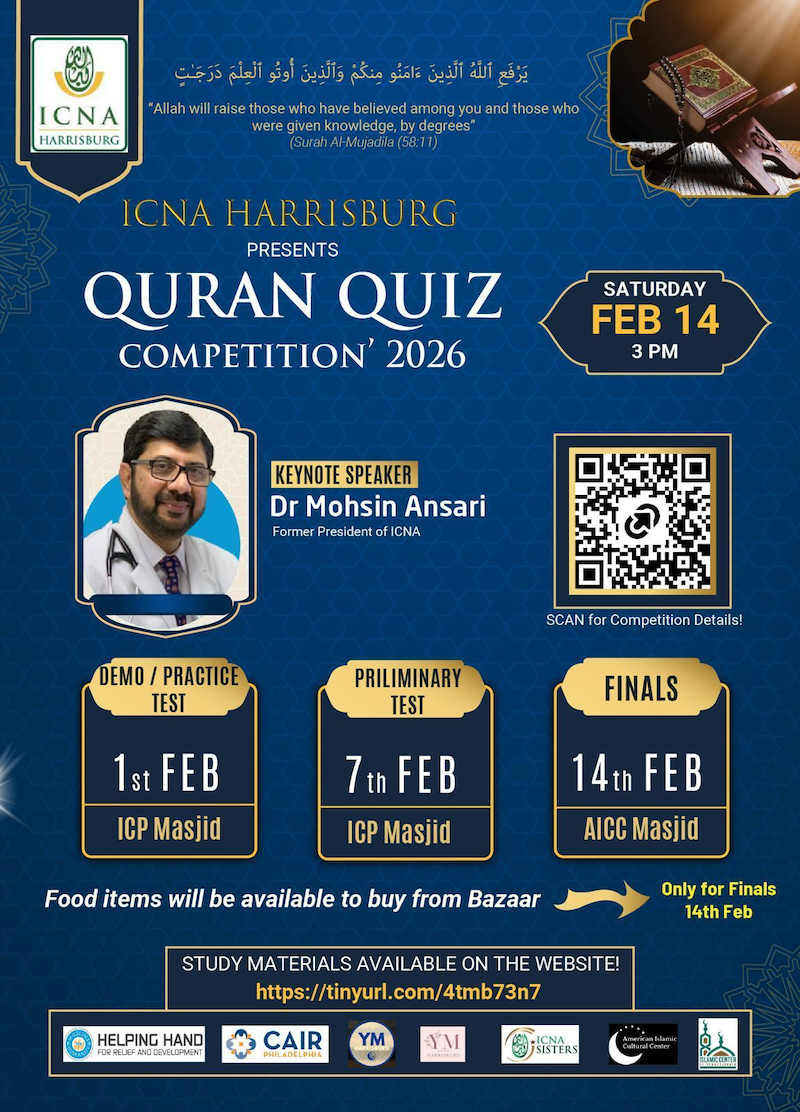
The Islamic Circle of North America (ICNA) Harrisburg chapter, in collaboration with the Young Muslims chapter, is hosting an exciting Qur'an Quiz Competition for our young community members. This is a wonderful opportunity for children and youth to deepen their understanding of Islam while competing in a fun, supportive environment!
Address: 5138 East Trindle Road, Mechanicsburg, PA 17050
🏆 Finals: American Islamic Cultural Center (AICC)
Address: 7117 Wertzville Road, Mechanicsburg, PA 17050
🏆 Prizes & Recognition
Every participant receives a certificate of participation! Winners at each level will receive attractive cash prizes, including a laptop for the 1st price. This is not just about winning—it's about learning, growing, and celebrating our Islamic knowledge together!
📚 Competition Levels
We have four exciting levels designed for different age groups:
Level 1
Up to 2nd Grade
Level 2
3rd, 4th, and 5th Grades
Level 3
Middle School
Level 4
High School & Above
📖 Areas Tested
- Quiz on Quran Ayat/Topics: 50% of the quiz
- Quiz on Hadith: 20% of the quiz
- Quiz on Seerah: 20% of the quiz
- Quiz on Islamic Science and History: 10% of the quiz
📚 Study Materials
Prepare for success! Download study materials for your level:
🎮 What is Kahoot?
Kahoot is a fun, interactive game-based learning platform where you answer questions shown on the big screen. Everyone plays together and earns points for correct and fast answers. It's like a game show, but for learning about Islam!
- Answer questions in real-time with your friends
- See your score go up with every correct answer
- Exciting music and colorful graphics
- Compete for the top spot on the leaderboard!
Equipment Instructions:
- 📱 One device (tablet, phone, Chromebook, or laptop)
- ‼️ No device will be provided by the organizers. Parents need to ensure their kids have access to one of the above devices during the time of the competition.
- ‼️ Parents need to disable the auto screen lock on their device during the competition.
Device Settings to Prevent Screen Lock
📱 iPhones and iPads (iOS / iPadOS)
- Open Settings → Display & Brightness → Auto-Lock.
- Set Auto-Lock to Never so the screen does not turn off automatically.
- Turn Low Power Mode off (Settings → Battery) if the Never option is unavailable.
- Recommend: keep the device plugged in during the competition.
🤖 Android phones & tablets
- Open Settings → Display → Screen timeout / Sleep (names vary by device).
- Choose the longest available time, or Never if offered.
- Optional (advanced): enable Developer options and set a very long timeout or enable “Stay awake while charging”.
- Keep the device plugged in during the competition.
💻 Chromebooks
- Method 1 (if not school-managed): Click the time → Settings → Device → Power (or Power & Sleep). Set Sleep and Display to maximum or Never.
- Method 2 (if extensions allowed): install the Keep Awake extension from the Chrome Web Store and enable the sun icon to keep the screen on.
- Note: Managed school Chromebooks may not allow overrides of sleep/lock rules.
🪟 Windows laptops
- Open Settings → System → Power & sleep. Set Screen and Sleep (On battery & Plugged in) to the longest time or Never.
- Optional: Control Panel → Power Options → Change plan settings → Put the computer to sleep → set to Never.
- If you don't have permission to change settings, follow your school/IT rules.
MacBooks (macOS)
- Open System Settings → Lock Screen. Set “Turn display off when inactive” to a long time or Never.
- In Energy / Displays & Energy, enable “Prevent automatic sleeping when the display is off” if available.
- Recommend: keep MacBooks plugged in throughout the competition.
Steps to join the game
Game Rules:
- 📖 Questions appear on the projector, NOT on your device
- 👂 Read or listen carefully to each question
- 👆 Tap the answer you think is correct
- ⚡ Answer quickly to earn more points
- 🎉 Have fun and do your best!
⚠️ Important Reminders:
- 🤚 Raise your hand if you need help
- 🤫 Stay quiet while questions are being asked
- 🚫 No shouting out answers
- 👀 Keep your eyes on the screen
- 🤝 Be respectful and kind to all players
- 📱 Use your device only for Kahoot
🌟 Why You Should Join! 🌟
This is YOUR chance to shine! Show everyone how much you know about Islam, the Quran, and our beautiful religion.
🎯 Challenge yourself and test your knowledge
🤝 Make new friends who love learning about Islam
🏆 Win amazing prizes and earn recognition
📚 Learn in a fun and exciting way
💪 Build confidence and public speaking skills
Don't miss this opportunity! Whether you're in elementary school or high school, there's a perfect level for YOU!
📞 Questions?
If you have any questions or need help with registration, please don't hesitate to reach out to us!
Email us at contact@icnahbg.org
We can't wait to see you there! 🎉
Please support

If you would like to list your business here please
contact this Organization's
Administration.
Our advertisement policy
